How to Decrypt DVDs and Make Copies [Top DVD Decrypter Review]
DVD drives have NOT been a thing for quite a few years now, so those of you who still have a DVD reader on your computer and haven't yet created digital copies of your DVD collections had better get cracking before you no longer have any DVD hardware available to copy them with! With a DVD decrypter, the job can be done easily.
Check for a more detailed review of top DVD decrypter programs.

Install WinX DVD Ripper Platinum
WinX DVD Ripper Platinum is a popular DVD decrypting tool that is free to download and use (5mins limits). It accepts any type of DVD disc and converts your DVDs to digital files. Note that physical DVDs protection remains, copies have no copy protection anymore.
Go to the WinX DVD Ripper Platinum website.
Click the Download button.
Wait for the download to complete.
Double click the downloaded WinX DVD Ripper Platinum .dmg or .exe file.
Double click the WinX DVD Ripper Platinum Icon.
Decrypting DVDs and Making copies
Once you have all of the requisite software you can now copy your collection.
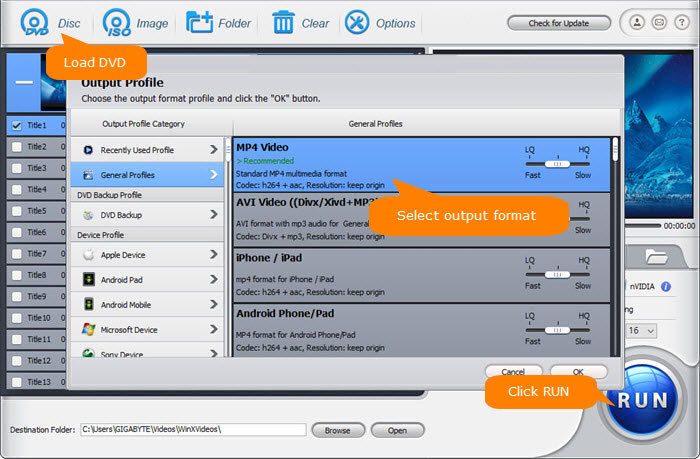
Open WinX DVD Ripper Platinum.
Select your DVD to decrypt.
Click Open.
Select the output format. MP4 H.264 is widely used.
Click Browse to select your save location.
Click the RUN button to start encoding. The DVD decrypter automatically bypasses any DVD copy protection without any third party help.
Legality
Copying protected DVDs may or may not be legal in your jurisdiction so please be aware of your local laws and rights on owning and decrypting digitally protected DVDs. All of the software being used in this tutorial is legally and freely downloadable. The application of such software may depend on your local laws.
Final comments
DVD at 480p can look old and outdated. Many streaming services have better quality visuals than physical DVDs can provide. So depending upon how much that matters to you, you might find that re-buying your favourite films and shows digitally might not worth the cost. Streaming vs DVD discs, which do you prefer?


Comments
Post a Comment